NEWVenvera speaks your language: the full platform, in English, German, Spanish and Bulgarian.See what’s new →
Evidence Autopilot

You approve. The system chases.

Half the job of compliance is chasing colleagues for evidence - emailing the network admin for the firewall screenshot, again, and losing the answer in a thread. Venvera does the chasing: name your contacts once, and every control's evidence ask routes itself to the right person with one no-login link. They upload. You approve. Compliance stays current by itself.

No-login submit linksReviewer approvalAutomatic renewalsFull provenance

The half of compliance nobody admits is the job.

Compliance managers do not spend their days interpreting frameworks - they spend them chasing evidence. Asking IT for the backup config, HR for the training records, facilities for the badge-reader export, then asking again, then reconciling what came back by email into the right control. Integration-based tools only automate what an API can reach; everything human - diagrams, screenshots, records, confirmations - stays a manual chase. Evidence Autopilot makes the chase itself the machine's job, and leaves you the only part that needs judgement: the approval.

 app.venvera.com
/ what your network admin sees - no login, no account, no excuses
1
Email per contact, listing every ask
0
Accounts or seats needed to contribute
30d
Renewals requested before expiry
You
Approve everything that counts
Set up once

Name your contacts. The routing is automatic.

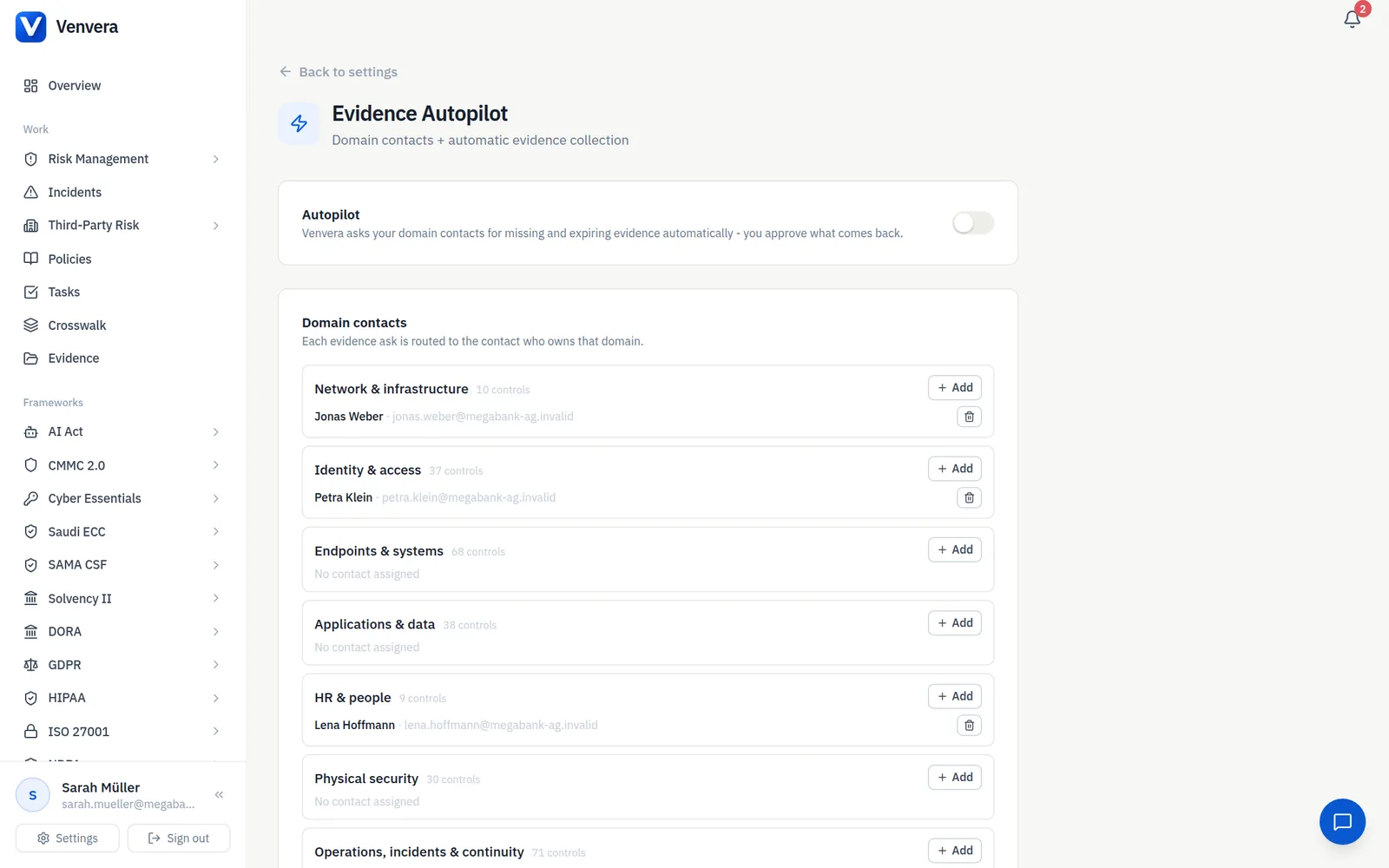
Assign one contact per domain - network, identity and access, endpoints and systems, applications and data, HR, physical security, operations, third parties. Venvera already knows which domain every control belongs to, so each ask lands with the person who actually has the answer. Anything unassigned falls back to you, never into a void.

  • Nine domains cover every control in your frameworks
  • Routing preview shows what each contact will own
  • Contacts are just names and emails - no accounts, no seats
  • Change a contact once, every future ask follows
 app.venvera.com
/ SETTINGS - one contact per domain, routing previewed
The ask

One email. One link. Everything they owe.

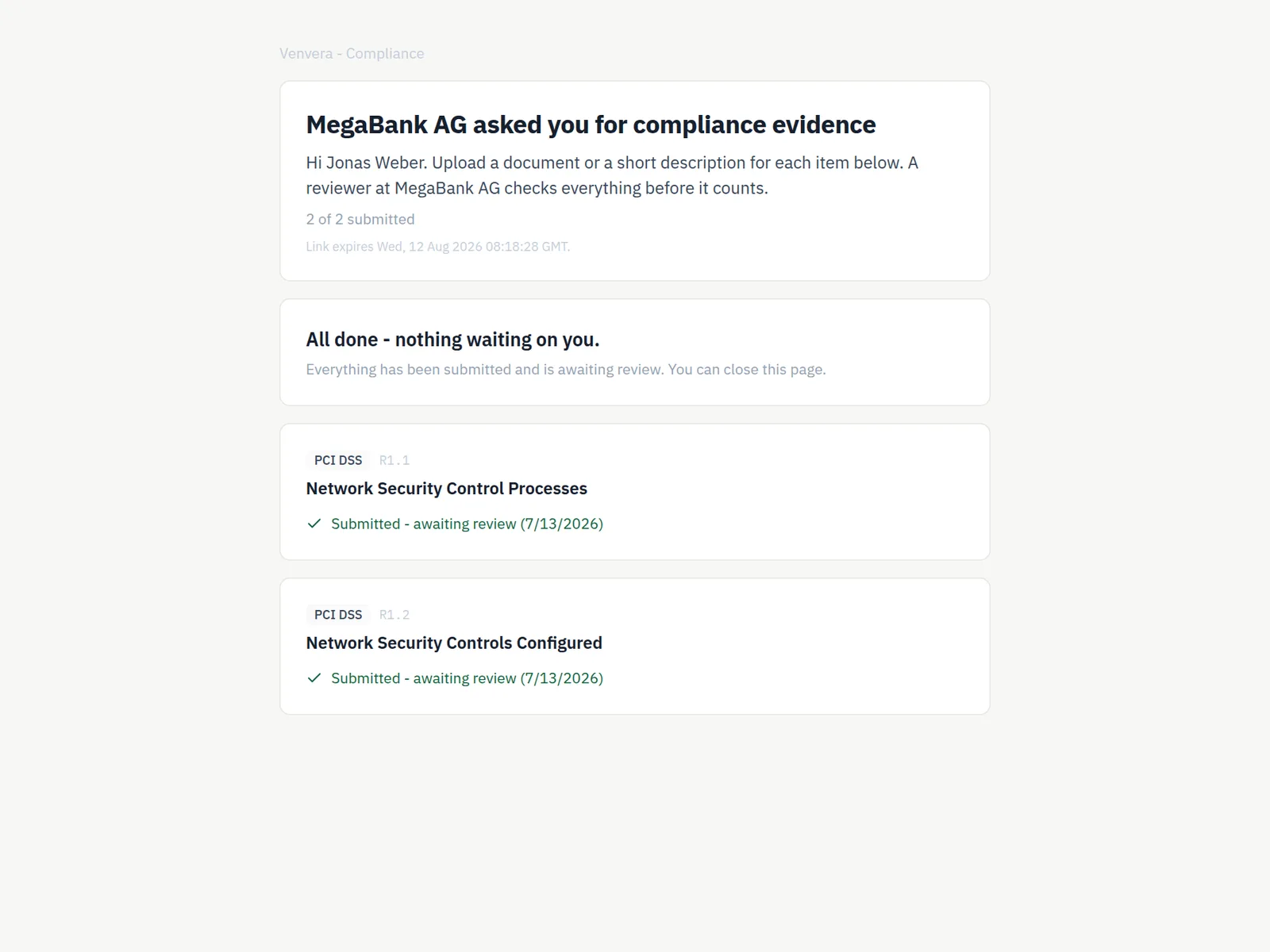
The network admin does not get six emails for six controls - they get one, listing everything their area owes, with a single link. The page behind it needs no login: each item shows what is asked for in plain language, with a file upload and a short-answer box. They see their own progress, and the link always reflects their current open list. One polite reminder after five days; never a drip campaign.

  • Batched asks: one email per contact, not per control
  • Plain-language explanation of what good evidence looks like
  • Upload a file or write a short confirmation - both count
  • Exactly one reminder, after five days
 app.venvera.com
/ THE LINK - a checklist, not a login wall
The approval

Nothing counts until you approve it.

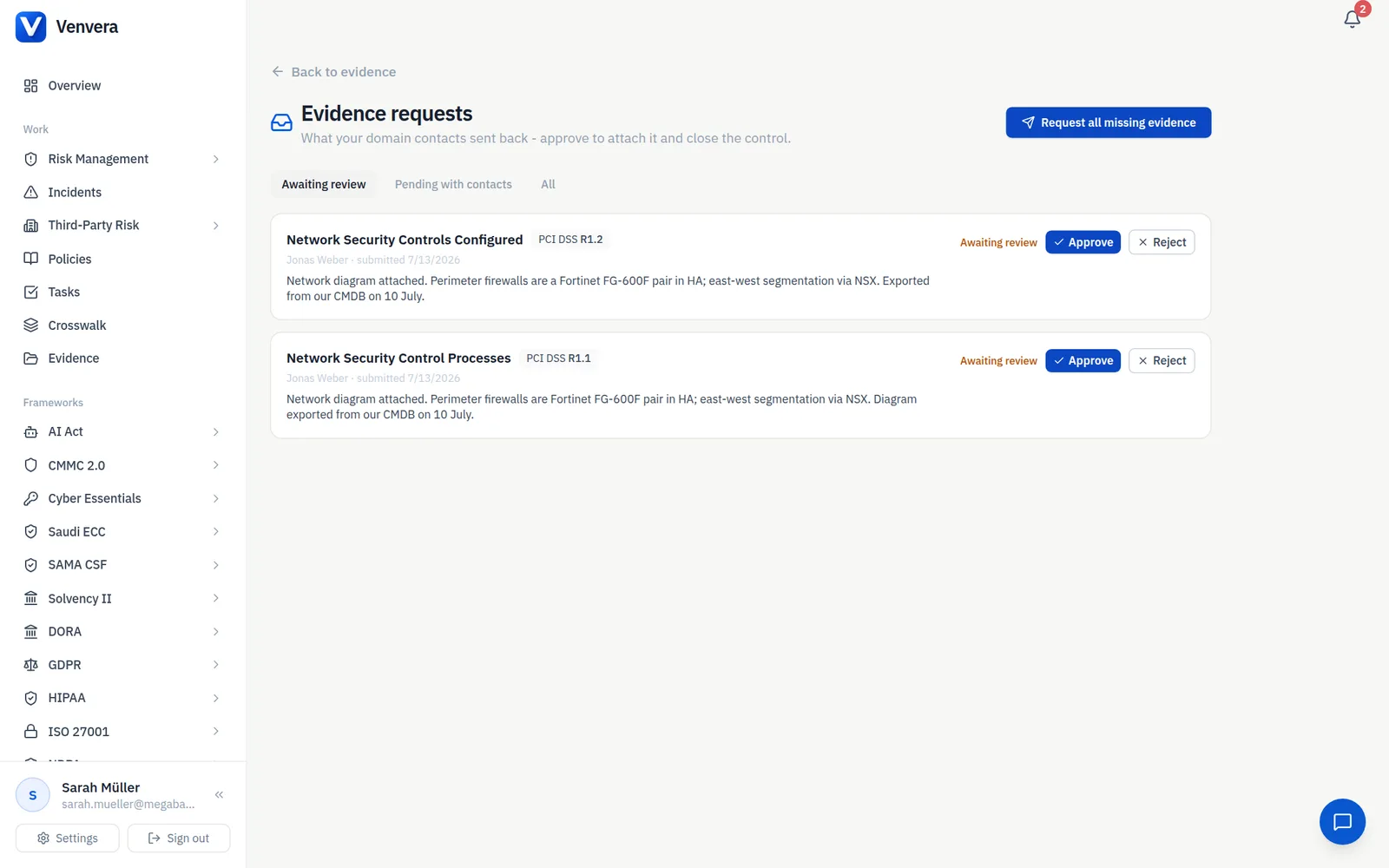
Submissions land in your review queue with the contact's file and note attached. Approve, and the control closes through the same evidence engine as everything else in Venvera - stamped with full provenance: who submitted, via which request, who approved. Reject with a note and the item reopens on the contact's link. Your posture never moves without a human decision, and every decision is auditable.

  • Review queue with file preview and the contact's note
  • Approve closes the control; reject sends it back with your note
  • Provenance on every artifact: submitted by, approved by, when
  • Framework-level edit permissions gate who can approve
 app.venvera.com
/ REVIEW - approve what counts, return what does not
One approval, many frameworks

Approved evidence spreads everywhere it applies.

Venvera's crosswalk maps every control to its equivalents across your frameworks. When you approve the firewall evidence for one control, the equivalent controls in your other frameworks close with it - the same proof, counted everywhere it is valid, with the propagation recorded. The chase happens once; the credit lands everywhere.

  • Approval closes the control and its crosswalk equivalents
  • Propagation counts shown on every approval
  • No duplicate asks for the same underlying proof
 app.venvera.com
/ CROSSWALK - one approval, every framework it satisfies
Stay compliant

Expiring evidence re-asks itself.

Every piece of evidence carries a review cycle. Thirty days before something expires, Autopilot creates a renewal request and routes it to the same domain contact - before the gap opens, not after an auditor finds it. Fresh submission, your approval, clock reset. This is the difference between getting compliant once and staying compliant without anyone remembering to.

  • Renewal asks created 30 days before expiry
  • Routed to the same contact who provided it last time
  • Staleness is visible, never silent
  • Daily scan, org-level switch, off by default until you enable it
 app.venvera.com
/ FRESHNESS - renewals requested before anything goes stale
Why switch

The spreadsheet or Venvera.

Chasing by email
Venvera
Who does the chasing
You, per control, per person, repeatedly
The system, routed by domain, batched per contact
What contributors need
Accounts, licenses, training on your tool
Nothing - one no-login link
Where answers end up
Threads, drives, and your memory
A review queue, then the control itself
Quality control
Whatever landed in the folder counts
Nothing counts until a reviewer approves it
When evidence expires
Nobody notices until the audit
Re-requested automatically, 30 days ahead
Proof for the auditor
Forwarded emails
Provenance on every artifact: who, what, when, approved by

Evidence Autopilot, answered.

Stop chasing evidence. Start approving it.

See Autopilot route, collect and renew evidence on your own frameworks - and keep the free gap report either way.

Every paid plan: audit-ready in 90 days, or your money back

10 minutes · no email to start · no credit card · yours to keep